Case study
Mini-SOAR: alert enrichment and threat hunting for a SOC
My own Python engine that queries the SIEM API. For every new Windows alert it collects context, assesses the alert from a security standpoint and adds a short, data-backed verdict with any relevant MITRE ATT&CK techniques. Every hour the threat hunting module searches the activity of all accounts and events for potential findings beyond SIEM alerts, and the analyzer module builds interactive reports on the behavior of a single account or event type.
- Technologies
- Python
- OpenSearch
- Sigma (pySigma)
- MITRE ATT&CK
- Active Directory
- PowerShell
- systemd
- SQLite
Context and goal
Mini-SOAR is my own SOAR-style project for enriching alerts in the SIEM. The engine does the first, repetitive steps of Windows alert analysis for the analyst: it collects context and the account’s previous behavior and writes the result straight into the alert. That way a decision can be made faster, without leaving the alert.
Problem
Before an analyst can make a decision, most alerts in a SOC need the same manual checks:
- whose account is it;
- where did the logon come from;
- were there failed attempts before;
- does this happen every day, or has it happened before.
It’s slow, repetitive work, and every analyst does it a little differently.
My role and division of work
Phase 1 - on my own
I wrote the first version of the engine myself: the architecture, alert parser, SIEM integration, context collection, the correlation engine with most of its investigators, Sigma rules, backlog handling and SQLite state.
Phase 2 - with an AI coding agent (Claude Code)
I then had an AI coding agent (Claude Code) audit the code and continued developing the project with it. I defined the requirements and detection logic, made the triage decisions, validated the results against real SOC work and ran the pilot; the agent implemented changes under my direction, with tests and review at every step. This phase added the analyzer, threat hunting, VPN attribution and pilot telemetry.
Data and tools
- Sources
- Windows/AD alerts and events from a SIEM based on OpenSearch, plus VPN gateway logs
- Detection
- analysis modules for each event type, SigmaHQ rules (pySigma) and mapping to MITRE ATT&CK
- Scheduling and state
- systemd timers; state, retries and backlog handling in SQLite
- Analyst access
- all results are in the SIEM, right on the alerts; only the user account analyzer is run separately, with a PowerShell script
- Tests
- over 700 unit tests on synthetic data that run in a few seconds
How it works
Input
- new Windows alerts in the SIEM (OpenSearch)
- Windows and Active Directory events
- VPN gateway logs
Engine (Python)
- every 90 s - enrichment
- hourly - threat hunting
- 01alert parser
- 02targeted context queries
- 03per-event-type analysis module
- 04SigmaHQ rules (pySigma)
- 05verdict: risk, rationale, MITRE ATT&CK
SQLite · systemd - state, retries, backlog
Output
- enriched alert
- hunting findings, without hourly duplicates
- HTML report for an account or event type (PowerShell script)
Alert enrichment every 90 seconds
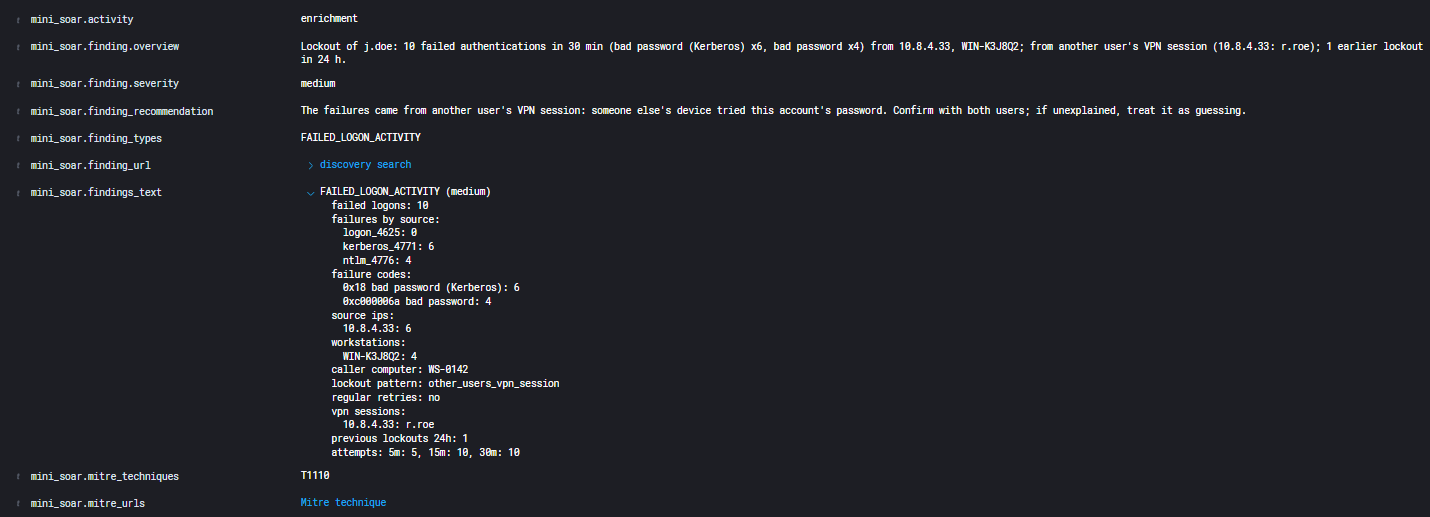
For every new alert the engine collects context and runs the analysis module that fits the event type, e.g. account lockouts, NTLM authentication on domain controllers, privileged accounts logging on at night, group and account changes, service installations, audit log clearing or application crashes. On top of that it checks the alert against SigmaHQ rules. The alert gets a risk level with its rationale, a recommended step, MITRE ATT&CK techniques and a link to the raw events with the filter already set.
Threat hunting every hour
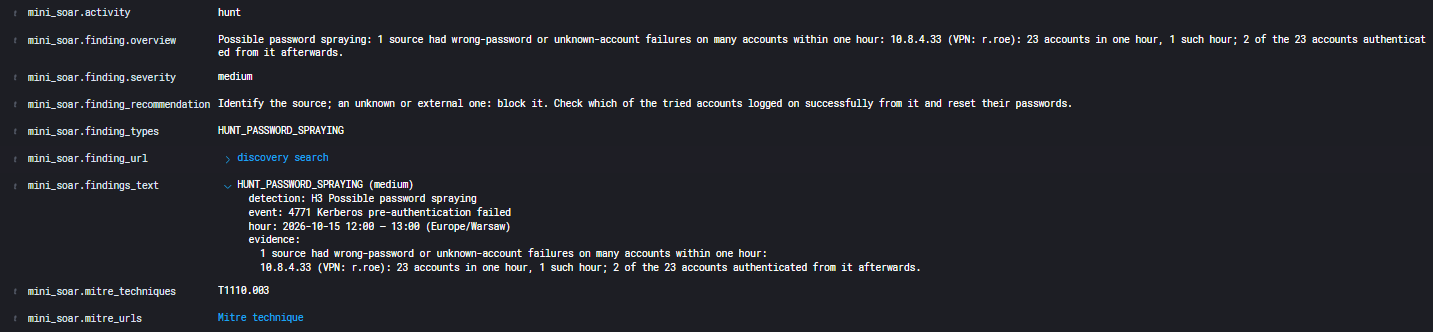
Once an hour the engine searches the activity of all accounts: password spraying, Kerberoasting, DCSync, risky account flags and sensitive directory changes. A recurring finding is appended to the first document, so it doesn’t raise a new alert every hour.
VPN session attribution
VPN gateway logs show who held a given VPN address at the time of the event. A logon from someone else’s VPN session is flagged as suspicious, while the account’s own session cuts the noise. The account report also lists its VPN sessions and checks for a new country, a new provider and impossible travel.
User account analyzer
A PowerShell script builds an interactive HTML report for an account or an event type. It compares activity with the same account’s baseline and tests hypotheses, including password guessing, account takeover, Kerberoasting, DCSync and lateral movement, each with a MITRE ATT&CK link and an L1 checklist. AD GUIDs, access masks and account flags are translated into plain language, and every element of the report works as a filter.
Key decisions
- The engine only adds information
- It never edits the real logs, it only adds information to the generated alerts. It never blocks or disables anything; the response decision always stays with the analyst.
- A pilot first
- Before going live, results went to a separate test index and the pilot collected full telemetry. That way the tool could be assessed on real work without changing production alerts.
- One finding, one document
- A recurring hunting finding doesn’t raise a new alert every hour; it’s appended to the first document instead.
- State in SQLite, scheduling in systemd
- State, retries and backlog handling are kept in SQLite, and runs are scheduled by systemd timers.
- Development without production data
- New features were built on synthetic and anonymized data and checked against the real SIEM only through aggregate numbers.
Security and privacy by design
- File names and logs contain no personal data, and only its owner can read a report.
- Remote analysis runs through a restricted SSH command with argument validation and an access log.
- Only allowlisted accounts have access, from allowed IP addresses and only from the internal network.
- No production data was ever used in development.
How I worked with AI
Rules first
A project rules file sets the agent’s boundaries: it never reads secrets, logs, databases or raw SIEM responses and works on synthetic data. Commits, runs against the SIEM and any changes to systems require my explicit approval. The agent’s access to sensitive data was also blocked through the environment configuration and permissions, not just written down in the rules.
Audit, then plan
“You are the lead engineer responsible for auditing, stabilizing and safely refactoring an existing production mini-SOAR. Get to know the repository, list the risks and propose a staged plan. Do not rewrite it from scratch.”
I gave the same prompt to two models, compared their audits and merged them into one plan.
Review before code
“Give me an overview of the next task: the problem, how the code works now, the options with their pros and cons, the files involved and the tests. Don’t implement anything yet.”
Once I picked an option: “Implement it, run the tests, show me the changes.”
An analysis module for a SIEM rule
“We have a new SIEM rule: [description omitted]. What context does an L2 analyst need to assess such an alert? Build an analysis module, test it on synthetic data, then run it against the test index.”
The rule’s description and definition have been omitted.
Measure, don’t read
“Run the pilot report and tell me how we’re doing. Numbers and categories only, no alert content.”
Evidence-based reviews
“Do a thorough audit of the module, but report as a bug only what a failing test, a synthetic case or numbers from a run confirm. Keep improvement ideas separate.”
Feedback from daily use
Short notes from my daily work with the reports, mostly about convenience and readability, went to the agent as the next tasks.
About the quotes
The quotes are prompts I used when working with the agent, translated from the Polish version of this description.
Rollout and results
- After a pilot, the engine has been in production since 09.2026 and handles all Windows alerts: it adds context or detections wherever it has something to add. It’s calibrated to the environment’s logs so it doesn’t add noise.
- The whole SOC team uses its results.
- A Windows alert is handled within about 2 minutes of the event (median), with 99.9% uptime.